Calibration Loop
This block supports calibration of a motion stage. When executed in a sequence, it computes a set of predetermined poses for the motion stage and for each computed pose calls a script point. This script point is expected to execute a task that extracts the features from a calibration plate.
When performing hand-eye calibration it is recommended that the stage undergoes two sets of motion. The first set should translate the stage to various points on a rectangular grid. The second set should rotate the stage to various points on a circular grid. This block has a set of properties that control the position and the number of points on the rectangular grid and circular grid.
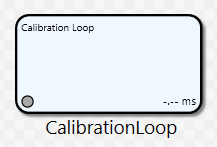
The purpose of this block is to generate poses for these points, in the following manner:
-
Before translating the stage to points on the rectangular grid, the stage is first rotated to the mean rotational position for the circular grid.
-
Before rotating the stage to points on the circular grid, the stage is first translated to the center of the rectangular grid.
-
When moving along the rectangular grid, the stage will go to the various points on the grid in a serpentine fashion.
General Information
Class name: CalibrationLoopBlock
Namespace: Cognex.Designer.AlignPlus.Calibration
Assembly: Cognex.Designer.AlignPlus.Calibration.dll
Properties
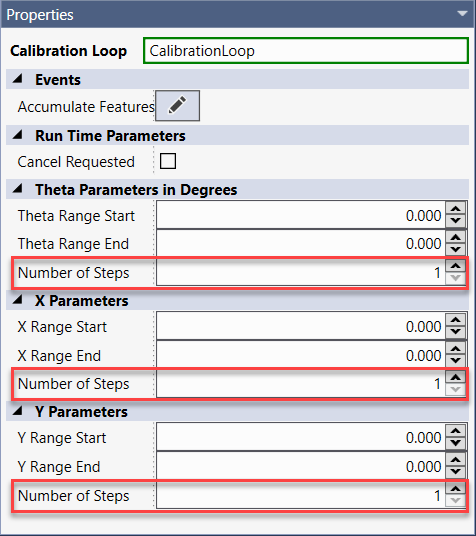
| Name | Type | Description |
|---|---|---|
| Theta Range Start | Double | Get/Set the starting position for the Theta axis (in degrees), used when generating stage poses on the circular grid. |
| Theta Range End | Double | Get/Set the ending position for the Theta axis (in degrees), used when generating stage poses on the circular grid. |
| Number of Steps on Theta axis | Double | Get/Set the number of samples when rotating the stage along the Theta axis of the circular grid. This property has a minimum value of 1. Throws System.ArgumentOutOfRangeException: If the setter value is less than one. |
| X Range Start | Double | Get/Set the starting position for the X axis (in mm), used when generating stage poses on the circular grid. |
| X Range End | Double | Get/Set the ending position for the X axis (in mm), used when generating stage poses on the circular grid. |
| Number of Steps on X axis | Double | Get/Set the number of samples when rotating the stage along the X axis of the circular grid. This property has a minimum value of 1. Throws System.ArgumentOutOfRangeException: If the setter value is less than one. |
| X Range Start | Double | Get/Set the starting position for the Y axis (in mm), used when generating stage poses on the circular grid. |
| X Range End | Double | Get/Set the ending position for the Y axis (in mm), used when generating stage poses on the circular grid. |
| Number of Steps on X axis | Double | Get/Set the number of samples when rotating the stage along the Y axis of the circular grid. This property has a minimum value of 1. Throws System.ArgumentOutOfRangeException: If the setter value is less than one. |
| Cancel Requested | Boolean | Gets/sets if a cancel was requested. If this property is set to true before or during execution, the looping is cancelled. |
These ranges and steps can also be set on Calibration Loop UI UI control.
Accumulate Features Script
This block supplies the script point "AccumulateFeatures". During execution this script point will be called for each pose in the generated set of stage poses. The script point will be called with suitable arguments to implement a single-pose feature extractor system.
bool AccumulateFeatures (Int32 Index, Double X, Double Y, Double Theta)
|
Name |
Type |
Description |
|---|---|---|
|
Index |
int |
The zero-based iteration count in the current calibration operation. The first call to this script point receives a zero, the second call a one, etc. |
|
X |
Double |
The X value of stage position that was used to acquire the images in this iteration |
|
Y |
Double |
The Y value of stage position that was used to acquire the images in this iteration |
|
Theta |
Double |
The Theta value of stage position that was used to acquire the images in this iteration |
Here is a sample code for reference:
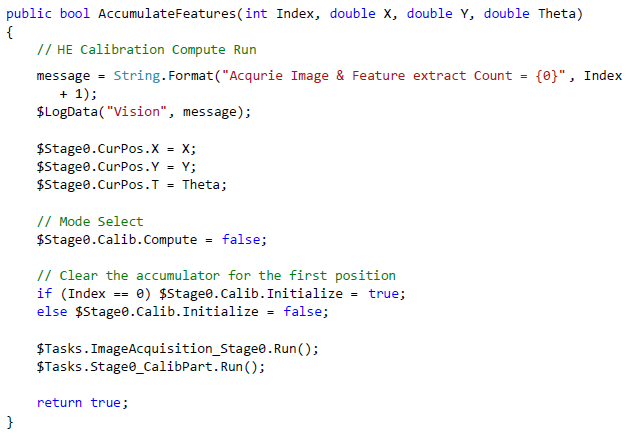
In case user wants to cancel the Loop in the middle, “CancelRequested” property need to be set as true via scripting, such as:

Task Workflow
Here is a typical design for Calibration Loop:
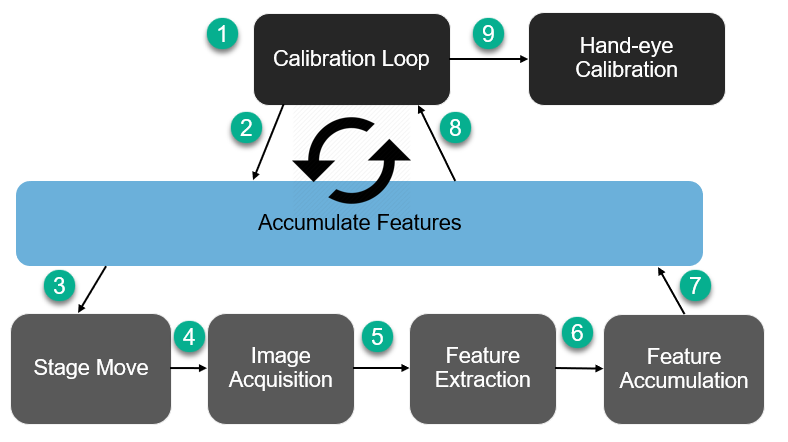
Calibration Loop is the starting block, after getting all steps information, it generates a for-loop which iterate all points in shortest path of stage move. At each point, it calls Accumulate Features scripting, in which stage will be moved to desired position, then camera conduct image acquisition, feature is extracted by vision and all those features are collected before moving to the next point. Step 2-8 runs again for the next point and so on. Step 2-8 are normally done in a separate task.
After all points’ features are collected, then it’s time to run the Hand-eye Calibration.